Showing posts with label All Software for Edit Picture. Show all posts
0
[DOWNLOAD] Focus Photoeditor 6.3.5 + Portable |


Focus Photoeditor 6.3.5 + Portable | 37 MB + 37 MB

Focus Photoeditor is a powerful image and photo editor, picture retouching tool, web album creator, image browser and Photoshop Filters Host Application for Windows. Besides its excellent ability to correct digital photos, it has many rich tools and effects found in much more expensive professional tools. And there are also many tools you can hardly find elsewhere, such as Quick Fix Wizard, Effective and Intelligent Automatic Corrections, Smart Color Replacement and extras like a web-album builder, a batch processor and support for photoshop plugins..

readmore »
0
Fractalius plugin |
Fractalius plugin

Fractalius plugin is to have a Photoshop plugin. This creates unusual, eccentric works in one step. Impact is based on extraction of so-called fractal image texture hidden. You can also simulate various types of exotic lighting and high realistic pencil sketches.

click here to download
readmore »
0
Photo Art Studio |


Photo Art Studio


"Photo Art Studio features a pretty, customizable user interface."
EditByBrothersoft: Photo Art Studio features a pretty, customizable user interface, easy to get along with. The program is easy and comfortable to operate, and its capabilities exceed your expectations! After just a few minutes, you will master the art of professional decoration of photos of any kind. The built-in help system and the online tutorial will help you turn your pictures into true masterpieces!

So, go ahead and launch Photo Art Studio and then open the first photo in it. The editor pane will come up right next; there you can adjust the primary properties of the image and crop your image. Next, by choosing the operating mode, you can shape up the photograph with special filters, apply classical and Modern frames, and create postcards and original collages.

Major Advantages of Photo Art Studio:

1. Convenient user interface and ease of operation.
2. Five automatic photo enhancement algorithms.
3. Over three hundreds of decoration schemes: frames, masks, postcards, collages.
4. Huge set of new templates in the full version, expandable template base.


click here to download
readmore »
0
PhotoInstrument |


PhotoInstrument


Easy and instant: PhotoInstrument is a program of aid for editing photos, especially the facial appearance in order to become more refined look. A face full of pimples, slight wound, or less smooth, can be enhanced through the function Glamour Skin or Skin Cleaner. Not only that, this program even remove an object in an image quickly, without having to delete and clone process as was done in a professional image processing programs. All process is done automatically. You just set the thickness of brush strokes and the power of your edited images.

Before you used to edit your appearance, the program provides tutorial in video mode. There are several examples of image enhancement that can be done from this tutorial. All examples are described in detail but not confusing. In fact, from this tutorial, you can create your skinny appearance in the photo so you look more slender and stout. Other standard functions can also be found here, such as eliminating red-eye effect, noise, clone, dodge, and the brightness and contrast settings.

conclusion that a very small program to help the beginner to improve his appearance in the photographs without requiring special skills.


click icon to download

readmore »
0
Nature Illusion Studio |


Nature Illusion Studio


Transform your vacation pictures into living nature sceneries with Nature Illusion Studio. Nature Illusion Studio allows you to apply various effects such as water, weather, or sound effects on any image to emulate various natural phenomena. With the combination of both visual and sound effects, you can produce very realistic animated nature scenes such as waterfalls, lakes, or seas. Finally you can save your creation as screensavers, executables, animated GIF's, or AVI's and share it to your friends !

Feature list

Water effects
- Apply up to 6 different types of water effects in a single image.
- Customize water effects settings such as amplitude, frequency, direction, etc.
- Preset water effects such as waterfall, lake, river, etc.
Animated Objects
- Add animated gifs.
- Add png images.
- Add text objects.
- Customize objects movement, appearance, fade-in/out, etc.
Weather effects
- Add snow effect to photos.
- Add rain effect to photos.
- Customize the particel counts, transparency, rain drops length, snow flakes size, and wind direction.
Sound effects
- Add wav files into your creation.
- Add sounds up to 8 channels.
- Customize the sound to appear randomly, random at specific time, or loops continuously.
Build your creation as screensavers
- Add background music (mp3, wma).
- Show clock.
- Adjust sound and music volume.
Build your creation as executables
- Add background music (mp3, wma).
- Adjust sound and music volume.
Build your creation as animated gifs
- Customize FPS(frames per second), resolution, and length.
- Dithering filter to minimize quality degradation.
Build your creation as videos (.avi)
- Build avi using any codecs available in your system.
- Customize the video resolution.
- Customize the video length.
Preview the result of your project instantly
- Auto preview provides instant feedback of your changes in real time, meaning you can see the result right away while you are drawing the water effects.
- Full screen preview to view your creation in full time with sound effects.
Integration
- Project files can be used in Ace Pro Screensaver Creator to build advanced full featured screensaver.
- Add your living photos into Nature Illusion Screensaver easily.


click icon to download

readmore »
0
AKVIS ArtWork |


AKVIS ArtWork


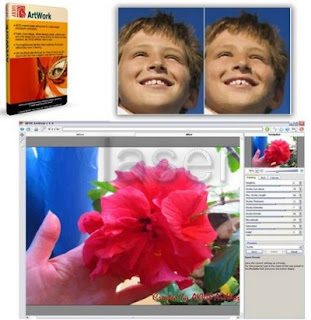
AKVIS ArtWork is an ideal solution for your creative expression. Combining advanced technologies with an artistic approach, the new AKVIS creative suite is a perfect virtual artist. Now AKVIS ArtWork offers three painting styles - oil Painting, Comics, and Pen & Ink. In the future, the program will learn additional painting techniques.The Oil Painting effect converts your photographs into oil paintings. The program lays brush strokes naturally using the original photo as a reference.

Unlike many other programs and Photoshop plug-ins, ArtWork creates a real painting out of a photo, not just adds twisted geometric lines to make it look like one. Even with the default settings you can achieve a realistic result coming very close to hand-painted works. Tweak the options, and you can research a variety of oil painting styles.

For those in need of more flexibility and having ideas on how the final panting should look, there is a tool called Stroke Direction. This semi-automatic and highly intelligent tool is a real godsend as it gives you full control over the strokes. Use a special brush to define the guiding lines, and the virtual painter will convert the image into a painting directing the strokes to follow the drawn guiding lines. With this technique you can achieve truly realistic paintings with human hair, patterns and textures going in the right direction.

The Comics effect allows ArtWork users to replicate works of famous comics artists with just a few clicks This effect reduces the tones of the photo to create an image similar to a poster or a cartoon. Make a comic strip from your party photos or create an original poster.

The Pen & Ink effect creates drawings that appear to be made with ink on paper. The ink color as well as the color of the background can be changed.

The plug-in version of ArtWork offers Batch Processing support that allows you to create comics from home videos!

AKVIS ArtWork includes ready-to-use AKVIS presets which help you start working. They can be applied "as is" or can be modified. The program lets you save your favorite photo-to-painting settings as a preset and use them in the future. It's possible to import and export your presets.

The virtual painter will take care of converting a digital picyure into a painting, but what else makes a painting look like a work of art? Canvas and the artist's signature! ArtWork offers the choice between a flat background and a rough surface (canvas, paper, etc.) that makes the impression even more stunning. You can add a signature or an inscription to the picture with your own font and color.

What Is It Good For?

Create an oil portrait of your friend, a landscape painting or a still life picture. Express yourself in new genres! You can print the final painting on a color printer, frame it or put it into a ready-made photo frame, or even add some real oil strokes to make the painting real. Create a greeting card or a poster, and you have a wonderful present for friends and family. No brushes or paints are required. Just get ArtWork and unleash your creativity.

Young artists and art teachers can use ArtWork to improve painting skills. Those who generally focus too much on details can first simplify their images using ArtWork, then use the result as a reference to paint their own oil painting.

The program is available in two versions - as an independent program (standalone) and as a plug-in to a photo editor.
The plug-in version is compatible with Adobe Photoshop, Photoshop Elements, Paint Shop Pro etc.

Refer to Consult the compatibility page for more details.

Attention! The functionality of the program depends on the license type. During the test period you can try all options and choose the license you like.

click icon to download
readmore »

Followers